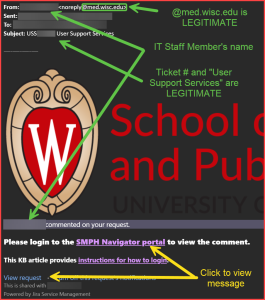
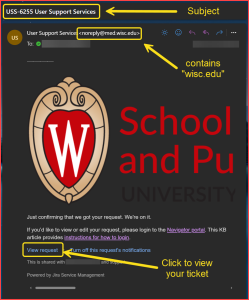
Two examples of legitimate alerts from Navigator (User Support Services) regarding your request:
After you’ve emailed a ticket, you’ll receive a confirmation email. The following example shows how to identify legitimate alerts from the system, and these are indicated by the yellow boxes and descriptions:
After someone from the Help Desk has commented on your ticket in Jira, you’ll receive an update that looks like the following example:
In the example above, emails from @med.wisc.edu are safe, and the Help Desk member’s name will appear in two different places. Similar to MyChart and Workday emails, you’ll need to click a link (indicated in yellow) to view the comment or change.